This page was generated from
docs/Examples/Fitting_Water_Silicate_Melts/Example4a_H2OQuant_Glass/H2O_Fitting.ipynb.
Interactive online version:
 .
.
Example 4 a- Fitting H2O:Silicate areas in glasses
This notebook shows how to quantify the relative area of the silicate peak and H2O peak in glasses
Please see example 4b if you want to quantify H2O/silicate areas in unexposed olivine-hosted melt inclusions
This folder lets you fit one spectra at a time - this is best if you need to adjust the fits for each spectra. It saves each fit to a CSV, then you go to the end of the notebook and stitch these all together into 1 file.
There is also an example coming soon for looping through all spectra using the same fit parameters
Install DiadFit if you havent already- uncomment this!
[1]:
#!pip install --upgrade DiadFit
Import necessary python things
[2]:
import numpy as np
import pandas as pd
import matplotlib.pyplot as plt
import DiadFit as pf
pf.__version__
[2]:
'1.0.3'
[3]:
# Set your ptah here - this assumes the txt files are in the same folder as the notebook, but you can easily add a different directory here. Chat GPT can help you with that!
import os
DayFolder=os.getcwd()
spectra_path=DayFolder
file_ext='.txt'
filetype='headless_txt'
[4]:
H2O_Files=pf.get_files(path=spectra_path,
file_ext=file_ext, sort=False)
H2O_Files
[4]:
['ETFS_OL39_MI7_50X_GLASS.txt', 'test_H2O.txt']
### Select file
Come back to here and change the i value
[5]:
print('max i value='+str(len(H2O_Files)-1))
max i value=1
[6]:
i=0
filename_H2O=H2O_Files[i]
print(filename_H2O)
ETFS_OL39_MI7_50X_GLASS.txt
[7]:
# Plot the spectra from the glass sample collected by Raman
spectra_H2O=pf.get_data(path=spectra_path, filename=filename_H2O,
            Diad_files=None, filetype=filetype)
plt.plot(spectra_H2O[:, 0], spectra_H2O[:,1], ':b')
plt.xlabel('Wavenumber')
plt.ylabel('Intensity')
[7]:
Text(0, 0.5, 'Intensity')
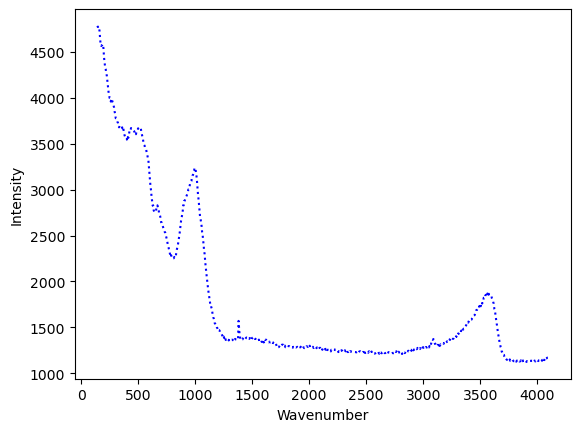
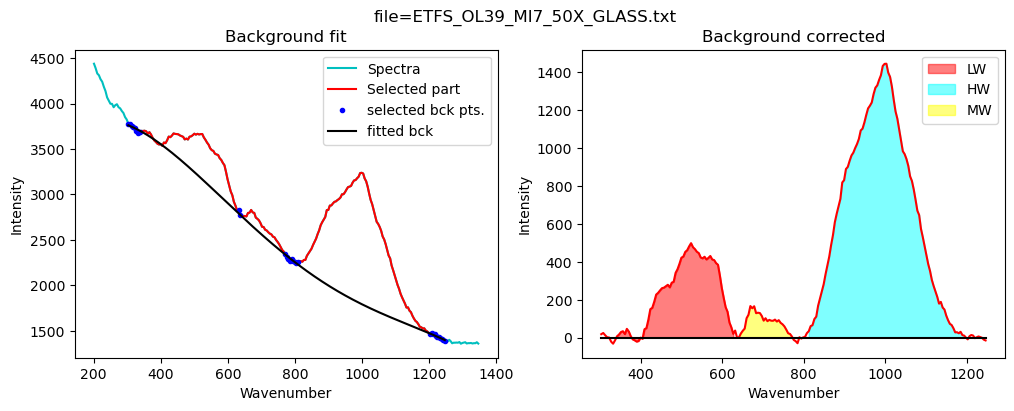
Now lets quantify the area under the silicate region
[8]:
# We have stored default fit parameters, you can see them here
pf.sil_bck_pos_Schiavi_basalt()
[8]:
sil_bck_pos_Schiavi_basalt(lower_range_sil=(300, 340), mid_range1_sil=(630, 640), mid_range2_sil=(800, 830), upper_range_sil=(1200, 1250), LW=(400, 600), HW=(800, 1200), N_poly_sil=3, sigma_sil=5)
[9]:
# You can edit any of them by writing the variable name between these brackets, and entering new numbers that might work better for your system
config_silicate=pf.sil_bck_pos_Schiavi_basalt(mid_range2_sil=(770, 810),
     N_poly_sil=4, LW=(400, 600), HW=(800, 1200))
config_silicate
[9]:
sil_bck_pos_Schiavi_basalt(lower_range_sil=(300, 340), mid_range1_sil=(630, 640), mid_range2_sil=(770, 810), upper_range_sil=(1200, 1250), LW=(400, 600), HW=(800, 1200), N_poly_sil=4, sigma_sil=5)
[10]:
# This cell calculates the area under the 3 different silicate regions
df_sil=pf.fit_area_for_silicate_region(Spectra=spectra_H2O,
path=spectra_path, filename=filename_H2O, config1=config_silicate,
exclude_range1_sil=None, exclude_range2_sil=None,  plot_figure=True,
fit_sil='poly')
df_sil
[10]:
| Silicate_LHS_Back1 | Silicate_LHS_Back2 | Silicate_RHS_Back1 | Silicate_RHS_Back2 | Silicate_N_Poly | Silicate_Trapezoid_Area | Silicate_Simpson_Area | LW_Silicate_Trapezoid_Area | LW_Silicate_Simpson_Area | HW_Silicate_Trapezoid_Area | HW_Silicate_Simpson_Area | MW_Silicate_Trapezoid_Area | MW_Silicate_Simpson_Area | |
|---|---|---|---|---|---|---|---|---|---|---|---|---|---|
| 0 | 300 | 340 | 1200 | 1250 | 4 | 362558.10011 | 362437.552216 | 69943.66401 | 69904.770625 | 265265.242676 | 265018.00209 | 11333.332933 | 11224.5619 |
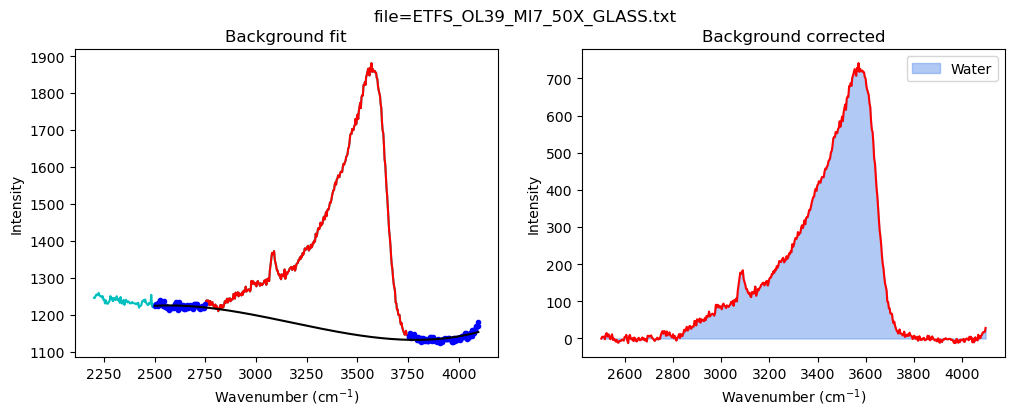
Now quantify the area under the water region
[11]:
# Again, there is a default set of variables
pf.water_bck_pos()
[11]:
water_bck_pos(fit_water='poly', N_poly_water=3, lower_bck_water=(2750, 3100), upper_bck_water=(3750, 4100))
[12]:
# And you can edit any of these values here - we are tweaking the lower background
config_H2O=pf.water_bck_pos(lower_bck_water=(2500, 2750))
print(config_H2O)

df_H2O=pf.fit_area_for_water_region(
path=spectra_path, filename=filename_H2O,
Spectra=spectra_H2O,
config1=config_H2O)
df_H2O
water_bck_pos(fit_water='poly', N_poly_water=3, lower_bck_water=(2500, 2750), upper_bck_water=(3750, 4100))
[12]:
| Water Filename | Water_LHS_Back1 | Water_LHS_Back2 | Water_RHS_Back1 | Water_RHS_Back2 | Water_N_Poly | Water_Trapezoid_Area | Water_Simpson_Area | |
|---|---|---|---|---|---|---|---|---|
| 0 | ETFS_OL39_MI7_50X_GLASS.txt | 2500 | 2750 | 3750 | 4100 | 3 | 274807.39519 | 274611.003728 |
[13]:
# This combines the outputs you got from silicate fitting and H2O fitting.
combo_out=pf.stitch_dataframes_together(df_sil=df_sil, df_water=df_H2O,
MI_file=filename_H2O, save_csv=True, path=DayFolder)
combo_out
[13]:
| MI filename | Water_to_HW_ratio_Trapezoid | Water_to_HW_ratio_Simpson | Water_to_Total_Silicate_ratio_Trapezoid | Water_to_Total_Silicate_ratio_Simpson | Water_Trapezoid_Area | Water_Simpson_Area | Silicate_Trapezoid_Area | Silicate_Simpson_Area | Silicate_LHS_Back1 | ... | HW_Silicate_Trapezoid_Area | HW_Silicate_Simpson_Area | MW_Silicate_Trapezoid_Area | MW_Silicate_Simpson_Area | Water Filename | Water_LHS_Back1 | Water_LHS_Back2 | Water_RHS_Back1 | Water_RHS_Back2 | Water_N_Poly | |
|---|---|---|---|---|---|---|---|---|---|---|---|---|---|---|---|---|---|---|---|---|---|
| 0 | ETFS_OL39_MI7_50X_GLASS.txt | 1.035972 | 1.036198 | 0.757968 | 0.757678 | 274807.39519 | 274611.003728 | 362558.10011 | 362437.552216 | 300 | ... | 265265.242676 | 265018.00209 | 11333.332933 | 11224.5619 | ETFS_OL39_MI7_50X_GLASS.txt | 2500 | 2750 | 3750 | 4100 | 3 |
1 rows × 26 columns
You have fitted one file - Now click this to go back to the top and do the next file and so on by changing i
Select file
Once you’ve fitted all your files…
Now stitch them, this code works by finding Stitching all the files together once you have them
[14]:
csv_files2=pf.get_files(path=DayFolder, ID_str='combo_fit',
    sort=True, file_ext='csv')
csv_files2
[14]:
['ETFS_OL39_MI7_50X_GLASS_combo_fit.csv', 'test_H2O_combo_fit.csv']
Stitch data from all these CSVs together
[15]:
df = pd.concat(
    map(pd.read_csv, csv_files2), ignore_index=True)
df
[15]:
| Unnamed: 0 | MI filename | Water_to_HW_ratio_Trapezoid | Water_to_HW_ratio_Simpson | Water_to_Total_Silicate_ratio_Trapezoid | Water_to_Total_Silicate_ratio_Simpson | Water_Trapezoid_Area | Water_Simpson_Area | Silicate_Trapezoid_Area | Silicate_Simpson_Area | ... | MW_Silicate_Trapezoid_Area | MW_Silicate_Simpson_Area | Water Filename | Water_LHS_Back1 | Water_LHS_Back2 | Water_RHS_Back1 | Water_RHS_Back2 | Water_N_Poly | HW:LW_Trapezoid | HW:LW_Simpson | |
|---|---|---|---|---|---|---|---|---|---|---|---|---|---|---|---|---|---|---|---|---|---|
| 0 | 0 | ETFS_OL39_MI7_50X_GLASS.txt | 1.035972 | 1.036198 | 0.757968 | 0.757678 | 274807.39519 | 274611.003728 | 362558.10011 | 362437.552216 | ... | 11333.332933 | 11224.5619 | ETFS_OL39_MI7_50X_GLASS.txt | 2500 | 2750 | 3750 | 4100 | 3 | NaN | NaN |
| 1 | 0 | test_H2O.txt | NaN | NaN | NaN | NaN | 274807.39519 | 274611.003728 | 362558.10011 | 362437.552216 | ... | 11333.332933 | 11224.5619 | test_H2O.txt | 2500 | 2750 | 3750 | 4100 | 3 | 3.928982 | 3.928359 |
2 rows × 29 columns
Now save to Excel
[16]:
df.to_excel('H2O_Silicate_areas.xlsx')
[ ]:
[ ]:
[ ]: