This page was generated from
docs/Examples/EOS_calculations/Example5c_LaPalma_FluidInclusions.ipynb.
Interactive online version:
 .
.
Example from La Palma
This notebook shows how to convert the Raman-based FI densities from Dayton et al. (2023) into pressures and depths in the crust
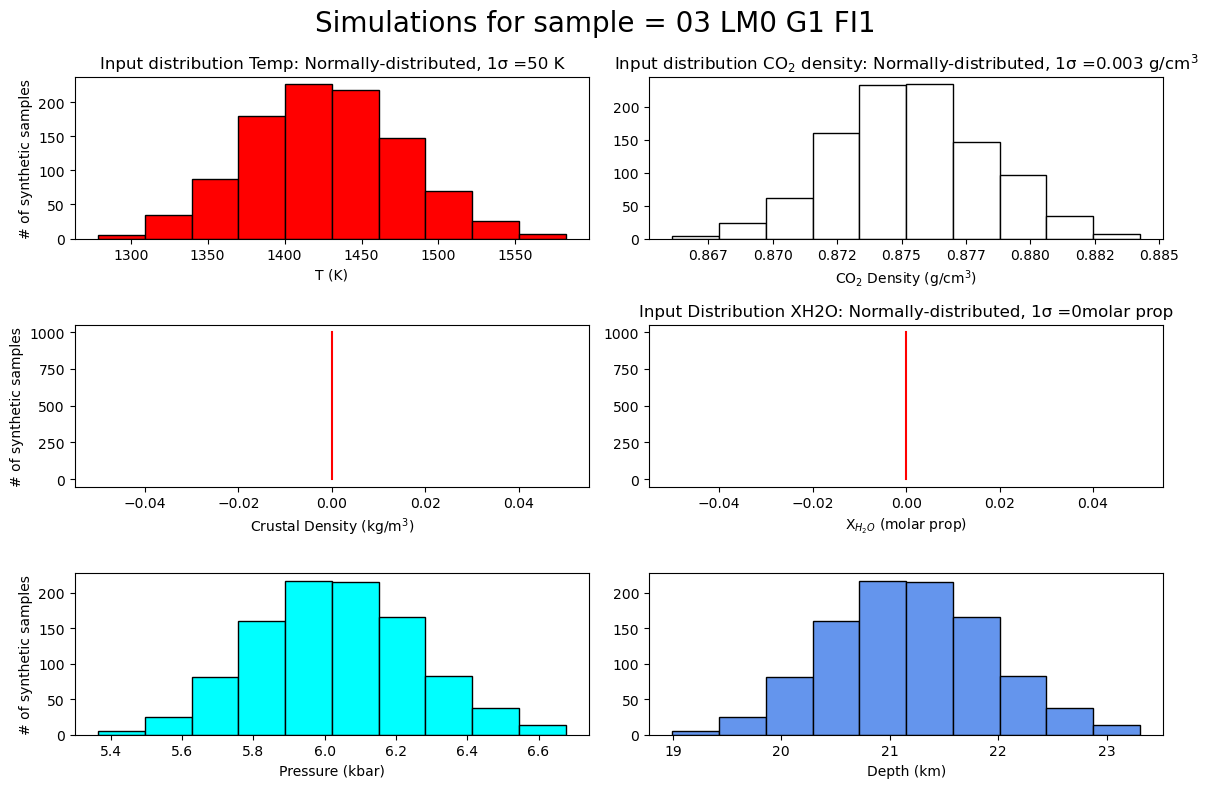
This assumes +-50K error in entrapment temperature, and an error in CO2 density of 0.002925 g/cm3
Depth is calculated using a 2-step density profile, with 2.8 g/cm3 above the Moho, and 3.1 g/cm3 below
You can download the excel spreadsheet here.
Install DiadFit if you havent already! You might also have to install CoolProp if you want to use Span and Wagner EOS - the error message will give you instructions, else reach out
[1]:
#!pip install --upgrade DiadFit
[2]:
import pandas as pd
import numpy as np
import matplotlib.pyplot as plt
import DiadFit as pf
pf.__version__
[2]:
'0.0.91'
Lets load in the data
[3]:
# Get from here: https://github.com/PennyWieser/DiadFit/blob/main/docs/Examples/EOS_calculations/Dayton_et_al_2023_LaPalma_Example.xlsx
data=pd.read_excel('Dayton_et_al_2023_LaPalma_Example.xlsx',
                   sheet_name='Sheet1')
data.head()
[3]:
| SAMPLE | FileName | Density (g/cm^3) | Comment (EPMA Data Point) | Na2O | MgO | SiO2 | Al2O3 | P2O5 | K2O | CaO | TiO2 | FeO | MnO | Cr2O3 | NiO | Total | Fo | |
|---|---|---|---|---|---|---|---|---|---|---|---|---|---|---|---|---|---|---|
| 0 | 0 | 03 LM0 G1 FI1 | 0.875343 | LM0_G1_RIM | 0.009036 | 42.12351 | 39.90642 | 0.018331 | 0.000023 | 0.005965 | 0.213926 | 0.034901 | 17.91823 | 0.292019 | 0.078602 | 0.190220 | 100.7912 | 0.807341 |
| 1 | 0 | 06 LM0 G2 FI1 | 0.780430 | LM0_G2_CENTER | 0.009698 | 44.42279 | 39.70696 | 0.008494 | 0.000023 | 0.000412 | 0.322745 | 0.022287 | 15.26419 | 0.225410 | 0.018465 | 0.194827 | 100.1963 | 0.838388 |
| 2 | 0 | 17 LM0 G3 FI3 | 0.936785 | LM0_G3_CENTER | 0.011004 | 45.31343 | 40.64921 | 0.016474 | 0.000023 | 0.003951 | 0.241455 | 0.018161 | 14.36721 | 0.216594 | 0.065003 | 0.260763 | 101.1633 | 0.848989 |
| 3 | 0 | 11 LM0 G3 FI1 (CRR) | 0.928828 | LM0_G3_CENTER | 0.011004 | 45.31343 | 40.64921 | 0.016474 | 0.000023 | 0.003951 | 0.241455 | 0.018161 | 14.36721 | 0.216594 | 0.065003 | 0.260763 | 101.1633 | 0.848989 |
| 4 | 0 | 19 LM0 G3 FI4 | 0.928514 | LM0_G3_CENTER | 0.011004 | 45.31343 | 40.64921 | 0.016474 | 0.000023 | 0.003951 | 0.241455 | 0.018161 | 14.36721 | 0.216594 | 0.065003 | 0.260763 | 101.1633 | 0.848989 |
[5]:
plt.hist(data['Density (g/cm^3)'], ec='k')
plt.xlabel('CO$_2$ density (g/cm^3)')
plt.ylabel('# of meas')
[5]:
Text(0, 0.5, '# of meas')

Now lets propagate uncertainty in each fluid inclusion
Here we use a temperature of 1150 K, with a +-50 K (i.e. an absolute uncertainty) distributed normally
We say the error in CO2 density (from repeated Raman measurements) is 0.002925 g/cm3 (i.e. an absolute uncertainty) distributed normally
We want to use 2 step crustal density model, with 2800 kg/m3 above 14km depth, and 3100kg/m3 below. Right now, we are not propagating uncertainty in this.
The figure shows us the simulation file the 1st file (file_i=0). For the Nth file, enter file_i=N-1 as python counting starts at 0
[6]:
MC_Av, MC_All, fig=pf.propagate_FI_uncertainty(
T_K=1150+273.15,
error_T_K=50,
error_type_T_K='Abs',
error_dist_T_K='normal',
CO2_dens_gcm3=data['Density (g/cm^3)'],
error_CO2_dens=0.002925, error_type_CO2_dens='Abs', error_dist_CO2_dens='normal',
sample_ID=data['FileName'],
model='two-step', d1=14, rho1=2800, rho2=3100,
N_dup=1000, fig_i=0, plot_figure=True)
MC_Av.head()
We are not using multiprocessing based on your selected EOS. You can override this by setting multiprocess=True in the function, but for SP94 and SW96 it might actually be slower
Processing: 100%|██████████| 115/115 [00:01<00:00, 76.97it/s]
[6]:
| Filename | CO2_dens_gcm3 | SingleCalc_D_km | SingleCalc_P_kbar | Mean_MC_P_kbar | Med_MC_P_kbar | std_dev_MC_P_kbar | std_dev_MC_P_kbar_from_percentile | Mean_MC_D_km | Med_MC_D_km | std_dev_MC_D_km | std_dev_MC_D_km_from_percentile | T_K_input | error_T_K | CO2_dens_gcm3_input | error_CO2_dens_gcm3 | crust_dens_kgm3_input | error_crust_dens_kgm3 | model | EOS | |
|---|---|---|---|---|---|---|---|---|---|---|---|---|---|---|---|---|---|---|---|---|
| 0 | 03 LM0 G1 FI1 | 0.875343 | 21.140399 | 6.016987 | 6.031485 | 6.026854 | 0.222039 | 0.219125 | 21.188075 | 21.172847 | 0.730127 | 0.720544 | 1423.15 | 50 | 0.875343 | 0.002925 | None | 0.0 | two-step | SW96 |
| 1 | 06 LM0 G2 FI1 | 0.780430 | 16.834446 | 4.707503 | 4.714673 | 4.712628 | 0.187193 | 0.188277 | 16.858021 | 16.851298 | 0.615543 | 0.619108 | 1423.15 | 50 | 0.780430 | 0.002925 | None | 0.0 | two-step | SW96 |
| 2 | 17 LM0 G3 FI3 | 0.936785 | 24.412263 | 7.011993 | 7.020079 | 7.023037 | 0.259320 | 0.266165 | 24.438851 | 24.448577 | 0.852716 | 0.875226 | 1423.15 | 50 | 0.936785 | 0.002925 | None | 0.0 | two-step | SW96 |
| 3 | 11 LM0 G3 FI1 (CRR) | 0.928828 | 23.965558 | 6.876146 | 6.870309 | 6.867972 | 0.247936 | 0.246916 | 23.946364 | 23.938680 | 0.815284 | 0.811931 | 1423.15 | 50 | 0.928828 | 0.002925 | None | 0.0 | two-step | SW96 |
| 4 | 19 LM0 G3 FI4 | 0.928514 | 23.948123 | 6.870844 | 6.869369 | 6.874090 | 0.253193 | 0.259509 | 23.943273 | 23.958798 | 0.832571 | 0.853339 | 1423.15 | 50 | 0.928514 | 0.002925 | None | 0.0 | two-step | SW96 |
[7]:
# This returns 2 dataframes, one showing the mean and standard deviation of the simulation for each fluid inclusion
MC_Av.head()
[7]:
| Filename | CO2_dens_gcm3 | SingleCalc_D_km | SingleCalc_P_kbar | Mean_MC_P_kbar | Med_MC_P_kbar | std_dev_MC_P_kbar | std_dev_MC_P_kbar_from_percentile | Mean_MC_D_km | Med_MC_D_km | std_dev_MC_D_km | std_dev_MC_D_km_from_percentile | T_K_input | error_T_K | CO2_dens_gcm3_input | error_CO2_dens_gcm3 | crust_dens_kgm3_input | error_crust_dens_kgm3 | model | EOS | |
|---|---|---|---|---|---|---|---|---|---|---|---|---|---|---|---|---|---|---|---|---|
| 0 | 03 LM0 G1 FI1 | 0.875343 | 21.140399 | 6.016987 | 6.031485 | 6.026854 | 0.222039 | 0.219125 | 21.188075 | 21.172847 | 0.730127 | 0.720544 | 1423.15 | 50 | 0.875343 | 0.002925 | None | 0.0 | two-step | SW96 |
| 1 | 06 LM0 G2 FI1 | 0.780430 | 16.834446 | 4.707503 | 4.714673 | 4.712628 | 0.187193 | 0.188277 | 16.858021 | 16.851298 | 0.615543 | 0.619108 | 1423.15 | 50 | 0.780430 | 0.002925 | None | 0.0 | two-step | SW96 |
| 2 | 17 LM0 G3 FI3 | 0.936785 | 24.412263 | 7.011993 | 7.020079 | 7.023037 | 0.259320 | 0.266165 | 24.438851 | 24.448577 | 0.852716 | 0.875226 | 1423.15 | 50 | 0.936785 | 0.002925 | None | 0.0 | two-step | SW96 |
| 3 | 11 LM0 G3 FI1 (CRR) | 0.928828 | 23.965558 | 6.876146 | 6.870309 | 6.867972 | 0.247936 | 0.246916 | 23.946364 | 23.938680 | 0.815284 | 0.811931 | 1423.15 | 50 | 0.928828 | 0.002925 | None | 0.0 | two-step | SW96 |
| 4 | 19 LM0 G3 FI4 | 0.928514 | 23.948123 | 6.870844 | 6.869369 | 6.874090 | 0.253193 | 0.259509 | 23.943273 | 23.958798 | 0.832571 | 0.853339 | 1423.15 | 50 | 0.928514 | 0.002925 | None | 0.0 | two-step | SW96 |
[8]:
# The second output shows every single simulation for each FI. So the first N rows are for the first FI, then next N rows for the next, etc.
MC_All.head()
[8]:
| Filename | Pressure (kbar) | Pressure (MPa) | Depth (km) | MC_crust_dens_kgm3 | model | MC_T_K | MC_CO2_dens_gcm3 | |
|---|---|---|---|---|---|---|---|---|
| 0 | 03 LM0 G1 FI1 | 6.121520 | 612.151979 | 21.484133 | None | two-step | 1456.265617 | 0.872784 |
| 1 | 03 LM0 G1 FI1 | 5.747624 | 574.762434 | 20.254659 | None | two-step | 1364.131195 | 0.874644 |
| 2 | 03 LM0 G1 FI1 | 6.452705 | 645.270453 | 22.573163 | None | two-step | 1508.484791 | 0.879484 |
| 3 | 03 LM0 G1 FI1 | 6.292424 | 629.242358 | 22.046114 | None | two-step | 1482.444938 | 0.876493 |
| 4 | 03 LM0 G1 FI1 | 6.435249 | 643.524923 | 22.515765 | None | two-step | 1517.705758 | 0.875919 |
Lets segment for the eruption sample
These are ‘Logicals’ e.g. a list of True and False statements, these allow us to splice up the dataframe for each sample
[10]:
sam0=data['SAMPLE']==0 # this gives a list of true and false for sample = 0
sam1=data['SAMPLE']==2
sam4=data['SAMPLE']==4
sam6=data['SAMPLE']==6
[12]:
## For example, lets get the data for sample 6
data.loc[sam6].head()
[12]:
| SAMPLE | FileName | Density (g/cm^3) | Comment (EPMA Data Point) | Na2O | MgO | SiO2 | Al2O3 | P2O5 | K2O | CaO | TiO2 | FeO | MnO | Cr2O3 | NiO | Total | Fo | |
|---|---|---|---|---|---|---|---|---|---|---|---|---|---|---|---|---|---|---|
| 90 | 6 | 01 LM6 G1 FI1 | 0.833430 | LM6_G1_CORE2 | 0.000013 | 41.97921 | 39.79742 | 0.016172 | 0.000023 | 0.000012 | 0.244621 | 0.039359 | 18.16324 | 0.289626 | 0.025383 | 0.200139 | 100.7552 | 0.804681 |
| 91 | 6 | 07 LM6 G1 FI4 | 0.831903 | LM6_G1_CORE3 | 0.007265 | 41.50474 | 40.45826 | 0.021972 | 0.000023 | 0.001032 | 0.254588 | 0.019733 | 17.99747 | 0.307189 | 0.015767 | 0.176755 | 100.7648 | 0.804335 |
| 92 | 6 | 03 LM6 G1 FI2 | 0.879573 | LM6_G1_NEARMI | 0.019585 | 41.74017 | 39.96414 | 0.049670 | 0.000023 | 0.004542 | 0.251532 | 0.040087 | 18.45561 | 0.240858 | 0.020140 | 0.172209 | 100.9586 | 0.801251 |
| 93 | 6 | 05 LM6 G1 FI3 | 0.796166 | LM6_G1_NEARMI | 0.019585 | 41.74017 | 39.96414 | 0.049670 | 0.000023 | 0.004542 | 0.251532 | 0.040087 | 18.45561 | 0.240858 | 0.020140 | 0.172209 | 100.9586 | 0.801251 |
| 94 | 6 | 72 LM6 G10 FI1 | 0.848642 | LM6_G10_CENTER | 0.045207 | 42.88505 | 40.72833 | 0.171445 | 0.019677 | 0.014681 | 0.371840 | 0.060140 | 17.00363 | 0.246182 | 0.000881 | 0.212640 | 101.7597 | 0.818041 |
Lets plot each FI depth and its error bar, colored by sample (as in Dayton et al. 2023)
[15]:
fig, (ax1) = plt.subplots(1, 1, figsize=(6,5))


ms=7
# This plots a symbol with its error bar for sample 0
ax1.errorbar(data['Fo'].loc[sam0],
             MC_Av['SingleCalc_D_km'].loc[sam0],
             xerr=0, yerr=MC_Av['std_dev_MC_D_km_from_percentile'].loc[sam0],
             fmt='o', ecolor='k', elinewidth=0.8, mfc='red', ms=ms, mec='k', capsize=5)

# This plots a symbol with its error bar for sample 1
ax1.errorbar(data['Fo'].loc[sam1],
             MC_Av['SingleCalc_D_km'].loc[sam1],
             xerr=0, yerr=MC_Av['std_dev_MC_D_km_from_percentile'].loc[sam1],
             fmt='^', ecolor='k', elinewidth=0.8, mfc='green', ms=ms, mec='k', capsize=5)

# This plots a symbol with its error bar for sample 4
ax1.errorbar(data['Fo'].loc[sam4],
             MC_Av['SingleCalc_D_km'].loc[sam4],
             xerr=0, yerr=MC_Av['std_dev_MC_D_km_from_percentile'].loc[sam4],
             fmt='v', ecolor='k', elinewidth=0.8, mfc='blue', ms=ms, mec='k', capsize=5)

# This plots a symbol with its error bar for sample 6
ax1.errorbar(data['Fo'].loc[sam6],
             MC_Av['SingleCalc_D_km'].loc[sam6],
             xerr=0, yerr=MC_Av['std_dev_MC_D_km_from_percentile'].loc[sam6],
             fmt='s', ecolor='k', elinewidth=0.8, mfc='orange', ms=ms, mec='k', capsize=5)
ax1.set_xlabel('Fo content')
ax1.set_ylabel('Depth (km)')
ax1.invert_yaxis()
ax2=ax1.twinx()
ax2.invert_yaxis()
# This sets the range of pressures you want
Plim1=3.8
Plim2=8.1
ax2.set_ylim([Plim2, Plim1])
# This calculates the corresponding depths for those pressures.
D_Plim1=pf.convert_pressure_depth_2step(P_kbar=Plim1, d1=14, rho1=2800, rho2=3100, g=9.81)
D_Plim2=pf.convert_pressure_depth_2step(P_kbar=Plim2, d1=14, rho1=2800, rho2=3100, g=9.81)
ax1.set_ylim([D_Plim2, D_Plim1])
ax2.set_ylabel('Pressure (kbar)')
[15]:
Text(0, 0.5, 'Pressure (kbar)')

Complex double axis aligning
The plot above was relatively easy, because we were always working below the density transition from layer 1 to layer 2
Be careful - if your density transition lies in the range, showing the axes is very complicated!
One option is presented here. https://stackoverflow.com/questions/59349185/non-linear-second-axis-in-matplotlib